
Almost ten years ago, I wrote a review of Pinboard, the “social bookmarking for introverts” service that I had been happily using to hoard links, always with the firm intention of reading them later, which in most cases, I never did.
A lot has changed since then. Finding information online has become easier, links go stale faster than ever, Pinboard has been languishing, and I’ve decided it’s time to move on. But what to do with two decades’ worth of bookmarks? Most of them are outdated, and I didn’t want to bother migrating the whole collection to a new bookmark manager. Still, I wasn’t ready to just throw them away either. I wanted a last resting place for my Pinboard link collection, something I could fire up locally whenever I needed to dig up an old link, independent of the Pinboard service. So with a little help from my new friend Claude, I built Pinboard Archive.
#What It Does
Pinboard Archive is a single-file HTML app that makes your exported Pinboard bookmarks searchable and filterable, entirely offline and local. You export your bookmarks as JSON from Pinboard (or a similar service), run a small Python build script, and get a self-contained HTML file that you can open in any modern browser. The build script packages the data as JavaScript rather than JSON so that the page works when opened directly from the filesystem, no web server needed. No frameworks, no dependencies, no data sent anywhere.
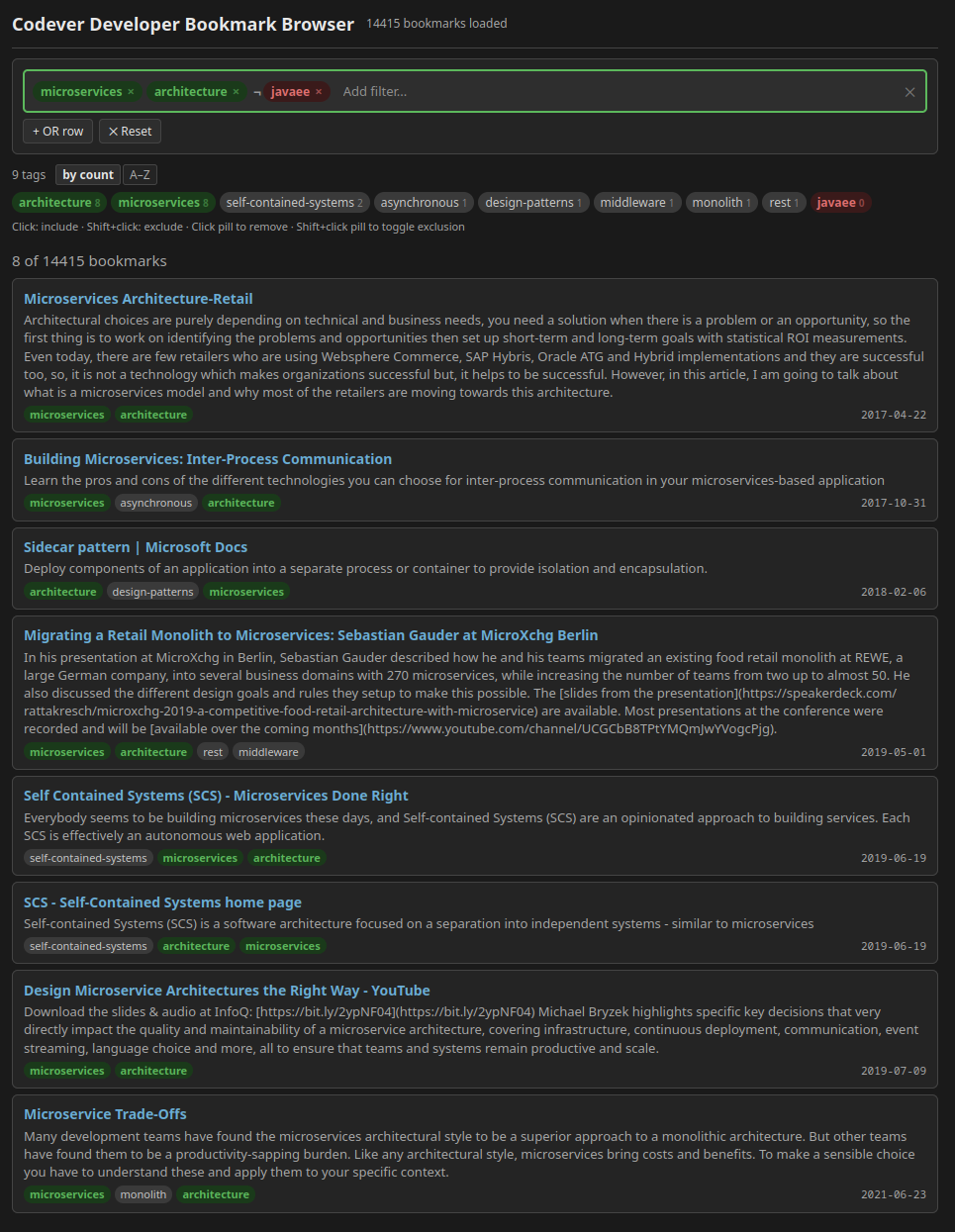
The part I’m most pleased with is the filtering UX. I wanted to experiment with making tag-based filtering genuinely enjoyable, and I think I found a nice solution. The app uses a DNF (Disjunctive Normal Form) approach for the logical filtering: you build filter rows connected by OR, and within each row, conditions are AND-connected. You can click a tag to include it (shown in green) or shift-click to exclude it (shown in red). There’s an omni-input that works for both tag search and free-text filtering, a row-scoped tag cloud that narrows as you add conditions, and live-updating results as you type. It sounds more complex than it feels; in practice, it’s fast and intuitive.
For fun, I also used Pinboard Archive to create a browsable page from the public bookmark collection of Codever, an open-source bookmarks and snippets manager for developers. The build script already supports importing from Codever, so it was easy to try out, and it makes for a nice demo of what the tool can do with a larger, tag-heavy dataset:
#Moving On
My main motivation for building this was practical: I needed a way to preserve my bookmarks without being tied to a service that I’m leaving. Pinboard served me well, but it’s time for something new. I’ll probably write more about my new bookmark hoarding setup in a future post. For now, Pinboard Archive gives me the peace of mind that my old links are always just a file open away, a quiet archive I can search whenever nostalgia or necessity strikes.
Browsing through my old bookmarks has also given me a fun idea: revisiting some of those topics from back in the day and reflecting on them with the benefit of hindsight. Which predictions came true, which didn’t? What turned out to be a passing fad, and what has stood the test of time? That might make for some entertaining future blog posts.
Pinboard Archive is open source on GitHub. While it’s built for Pinboard exports, the build script’s property mapping is easy to adapt for other JSON formats, so even if you’ve never used Pinboard, it might serve as a lightweight local bookmark browser for your own collection. If that sounds useful, give it a try.
By the way, for those who are still happily using Pinboard: I’ve also published a new release (0.4.5) of the Pinboard Pin Firefox extension. It now runs on Angular 21 under the hood and fixes two small issues from the last release.